
Free Fire MAX Headshot Guide (2026): Best Headshot Settings, One Tap Tips & Accuracy Guide:
What This Free Fire Headshot Guide Covers:
This guide covers every legitimate way to improve your free fire headshot accuracy — sensitivity settings, HUD layout, weapon selection, device optimization, and a daily practice routine. Each section comes with ready-to-use numbers and step-by-step techniques so you can apply them directly.
Who This Headshot Free Fire Guide Is For:
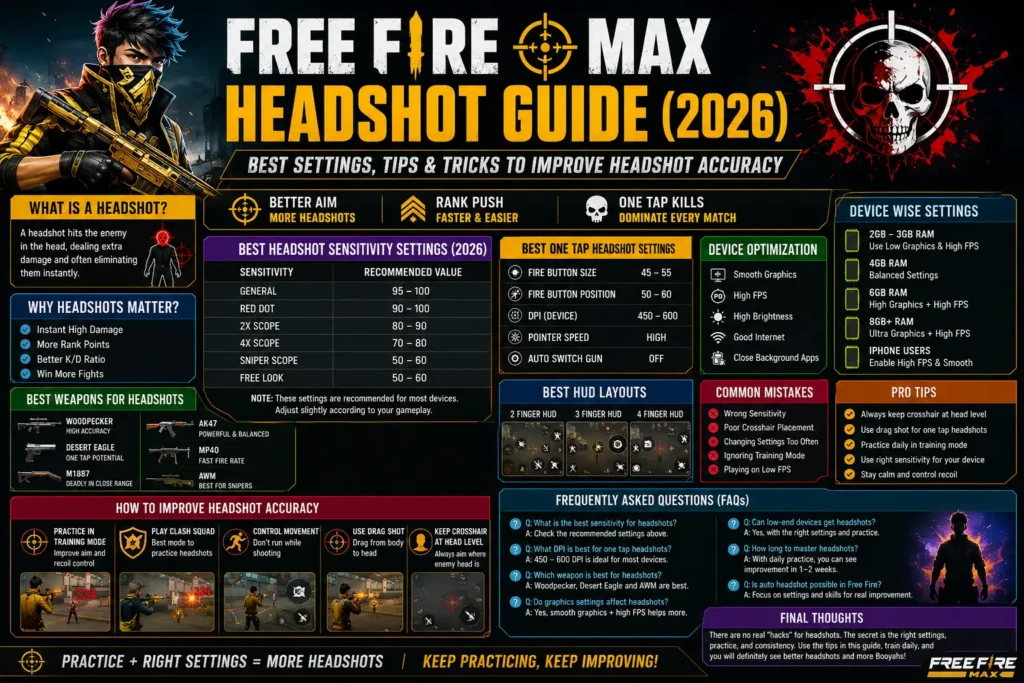
This guide is for players who want to improve their headshot free fire accuracy, from casual to competitive level — whether you’re playing on a 2GB RAM budget phone or an 8GB+ gaming phone. From beginners to ranked pushers, there are practical tips for every skill level. This guide was researched and put together by Zeeshan.
Key Takeaways
- Sensitivity should be calibrated to your device’s hardware (RAM, DPI, refresh rate) — copying a pro’s settings isn’t enough.
- Crosshair placement and pre-aiming discipline boost your headshot chances the most.
- The 4-finger HUD is best for advanced players, but beginners should start with 2 or 3-finger.
- Consistency (15–20 minutes of daily training) matters more than settings.
- Third-party tools, mod APKs, or “auto headshot hacks” carry a permanent ban risk under Garena’s zero-tolerance policy — always avoid them.
What Is a Headshot in Free Fire MAX?
How Headshots Work in Free Fire
Every weapon in Free Fire MAX has a hit-detection zone. When a bullet hits the enemy’s head hitbox, the game registers it as a headshot and applies multiplied damage instead of normal body damage.
Headshot Damage Multiplier Explained
Every weapon has its own headshot multiplier — pistols and shotguns like the Desert Eagle and M1887 have the highest multipliers, which is why they’re popular for “one tap” eliminations.
Why Headshots Matter in Ranked Matches
Fast eliminations in ranked matches give you a resource and positional advantage. A clean headshot can end a fight in seconds, which is especially critical in close-range and late-game zones.
Common Factors That Affect Free Fire Headshots
Sensitivity settings, crosshair placement, device FPS, internet ping, and HUD layout — all these factors together determine whether your headshot rate stays consistent.
Why Players Search for Free Fire MAX Headshot Hack
What Most Players Actually Want
Most players who search for “free fire max headshot hack” type queries actually want to improve their in-game settings and skill — not gain an unfair advantage. Genuine improvement comes from better sensitivity, HUD, and practice.
Difference Between Better Settings and Third-Party Tools
Settings simply align your touch input with the game’s response — that’s not cheating. Third-party tools (macro APKs, auto-aim mods) modify game files or automate inputs, which violates Garena’s Fair Play policy and can lead to a permanent account/device ban.
How Game Performance Affects Accuracy
Even perfect aim can miss on a device with low FPS or high ping because of input delay. That’s why device optimization matters just as much as settings.
Setting Realistic Expectations
No setting guarantees a 100% headshot. It only amplifies the results of your consistent practice. More details can be found on our disclaimer page.
Best Free Fire MAX Headshot Settings (2026)
The 2026 meta ranges below are recommended for most players, but fine-tune them based on your device.
General Sensitivity for Headshots
90–100 range — high values are essential for movement and drag responsiveness.
Red Dot Sensitivity Settings
85–95 — provides balanced control for close-mid range engagements.
2x Scope Settings
75–85 — provides stable aim for mid-range fights.
4x Scope Settings
65–75 — kept slightly lower to keep scope sway under control.
Sniper Scope Settings
30–60 — lower values are needed for long-range micro-adjustments and precision flicks.
Free Look Settings
Keep Free Look close to your General Sensitivity so camera movement feels natural.
Recommended Free Fire Headshot Settings Table
| Setting | Low-End (2–3GB) | Mid (4GB) | 6GB | 8GB+ Flagship |
|---|---|---|---|---|
| General | 190–200 | 175–190 | 160–175 | 140–160 |
| Red Dot | 185–195 | 170–185 | 155–170 | 135–155 |
| 2x Scope | 180–190 | 165–180 | 150–165 | 130–150 |
| 4x Scope | 165–180 | 150–170 | 135–155 | 120–140 |
| Sniper Scope | 110–140 | 100–130 | 85–120 | 70–110 |
| Free Look | 180–200 | 170–190 | 155–175 | 140–160 |
Best One Tap Headshot Settings
What Is One Tap Headshot?
A one tap headshot means eliminating an enemy with a single shot — mostly possible with high-damage weapons like the Desert Eagle, M1887, or Woodpecker.
Best Fire Button Size
45%–55% is the ideal range. A larger button reduces your “drag space,” making it harder to swipe up to the head.
Best Fire Button Position
Keep the fire button slightly above the bottom edge of the screen — this gap is necessary for advanced techniques like the Down-Up drag and Rotation (J-Drag).
Best Drag Shot Technique
Start firing at chest or neck level and drag smoothly upward to the head — don’t try to aim directly at the head.
Best DPI Settings for One Tap Headshot
400–480 DPI gives most players balanced control. Extreme values can make touch unstable.
Common One Tap Headshot Mistakes
- Aim becoming shaky from too-high sensitivity
- Making the fire button too large (reducing drag space)
- Trying to aim directly at the head instead of starting from the chest
How to Improve Headshot Accuracy in Free Fire
Crosshair Placement
Correct crosshair placement significantly increases your chances of landing a headshot. Always keep your crosshair at head level while moving across the map or checking corners — this means you won’t need to drag as far when an enemy appears. At long range, keep your crosshair on the enemy’s body; at short/mid range, dragging up from below the feet works well.
Aim Placement Before Shooting
“Pre-aiming” — setting your aim before firing — is very important. Use the Wait-and-Flick technique: wait for the enemy’s head to enter your crosshair’s neutral zone, then make a light flick. Aligning your aim during a Super Jump also makes you a harder target.
Movement Control
Keep your joystick stable while firing — stillness improves accuracy. Continuous firing increases recoil, so use the Split Fire technique (firing in short bursts). Crouching or going prone against distant enemies reduces recoil.
Reaction Time
High General Sensitivity improves reaction time. Pay attention to footstep audio so you can anticipate an enemy’s direction in advance. Reflex drills in the training ground help your mind and fingers react faster to enemy movement.
Training Mode Practice
Spend 15–20 minutes daily in the training ground. Start with 10 drag shots on stationary bots, then move to moving targets with different guns. If your aim goes above the head, lower sensitivity by 5 points; if it gets stuck on the body, raise it by 5 points.
Custom Room Practice
Play 1v1 custom rooms with friends with a “headshot only” rule. This is a rank-free environment where you can test your movement and strategy without risk, and playing against real players improves your prediction skills.
Best HUD Layout for Headshots
A professional HUD layout lets you move, aim, and fire simultaneously.
2 Finger HUD
The default setup for beginners — movement joystick and crouch on the left, fire/scope/jump on the right. Easy to learn but can feel sluggish in fast matches. Snipers should place the Quick Weapon Switch button near the joystick.
3 Finger HUD
An intermediate configuration where the left thumb controls movement and the left index finger presses a top-left fire button. This leaves the right thumb free for camera control and scoping — aiming and firing can happen simultaneously.
4 Finger HUD
The advanced professional standard — both thumbs and index fingers use the screen at once. Run, weapon switch, and secondary fire go to the left index finger; jump/crouch/primary fire go to the right thumb. This layout is best for high-speed maneuvers and “god-level” accuracy, though it’s the hardest to master.
HUD Customization Tips
- Place buttons where your fingers naturally rest, matching your grip
- Keep fire button size at 45%–55%
- Leave some drag space at the bottom edge
- Keep the scope button near your index finger
- Set button transparency to 40%–60%
- Practice 15–20 minutes daily with a new HUD to build muscle memory
Best Weapons for Headshots
Desert Eagle
The most iconic one-tap pistol — high damage and a devastating headshot multiplier. Master it by keeping the crosshair at head level and using a quick upward drag.
Woodpecker
A marksman rifle best for medium-to-long range precision — superior armor penetration and high single-shot damage.
M1887
The ultimate close-range headshot weapon (Double Barrel). A single well-placed shot can knock down an enemy — the drag needs to be fast and decisive.
AK47
A high-recoil weapon that can be used skillfully — the natural upward kick of the recoil can carry your aim to head level. Avoid the 4x scope, as the heavy recoil becomes hard to control.
MP40
A favorite for high-speed spray headshots — its extreme fire rate gives multiple chances to connect. Start at chest level and use a medium-speed gradual drag.
AWM
The deadliest long-range sniper — a single headshot means an instant elimination. Keep drags limited to micro-adjustments (1–2mm), since scope magnification makes large swipes uncontrollable.
Weapon Comparison Table
| Weapon | Type | Range | Technique | Headshot Impact |
|---|---|---|---|---|
| Desert Eagle | Pistol | Mid | One-Tap / Quick Drag | Extremely High |
| Woodpecker | Marksman | Long | Precision Tapping | High (Armor Pen) |
| M1887 | Shotgun | Short | One-Tap / Fast Snap | Instant Elimination |
| AK47 | AR | Mid | Recoil-Guided Drag | High Skill/Reward |
| MP40 | SMG | Short | Gradual Spray Drag | High Frequency |
| AWM | Sniper | Long | Micro-Adjustment | Deadly Accuracy |
Device Optimization for Better Headshots
Graphics Settings
Most pro players use “Smooth” or “Standard” graphics — it reduces visual clutter and keeps frame rate stable. Keep Auto-Adjust Graphics off to avoid sudden quality changes.
FPS Settings
Select the highest stable FPS available (High or 90 FPS). Enable High Performance mode in your battery settings. A stable 60 FPS beats an unstable 90 FPS.
Touch Response
Enable a high touch sampling rate (240Hz–720Hz). Keep DPI in the 400–480 range. On Android, set Animator duration scale to 0.5x in developer options; on iOS, keep Haptic/3D Touch set to “Fast.”
Screen Refresh Rate
90Hz or 120Hz displays give smoother aiming. If your refresh rate is 120Hz+, lower your General Sensitivity by 5–8%.
Internet Connection
High ping delays hit registration. Use 5GHz Wi-Fi, and close background apps during ranked matches.
Recommended Free Fire Headshot Settings by Device
2GB–3GB RAM Devices
General 190–200, Red Dot 185–195, Fire Button 44%–48%. Keep graphics on “Smooth.”
4GB RAM Devices
General 175–190, Red Dot 170–185, Fire Button 48%–52%. If your aim gets stuck on the chest, raise General by 5 points.
6GB RAM Devices
General 160–175, Red Dot 155–170, Fire Button 50%–54%.
8GB+ Gaming Phones
General 140–160, Red Dot 135–155, Fire Button 52%–58%. Enable High Performance mode and 90/120 FPS.
iPhone Users
Newer models (15/16/17): General 192–200. Balanced (12/13/14): General 188–198. Older (X/XR/11): General 182–194. Set Haptic to “Fast” and disable Background App Refresh.
Headshot Tips for Every Play Style
Rush Players
General sensitivity 95–100, master the J-Drag, and combine aim placement with Super Jump.
Support Players
General sensitivity 85–90 — stable tracking while staying ready for quick flicks.
Snipers
Keep Sniper Scope sensitivity at 30–40, place the Quick Weapon Switch button near the joystick, and use the Wait-and-Flick technique.
Close Range Players
Use the Down-Up drag to break the aim assist’s lock, and keep fire button drag speed fast.
Long Range Players
Use slow vertical drags, maintain pre-aim discipline, and prioritize muzzle/stock/foregrip attachments.
Common Mistakes That Reduce Headshot Accuracy
Wrong Sensitivity
Too-high sensitivity makes aim shaky; too-low makes the camera feel heavy. Copying a pro’s settings exactly is a mistake since it’s device-specific.
Changing Settings Too Often
Commit to one preset for at least a week. If you need to adjust, do it in small 5-point increments.
Poor Crosshair Placement
Keeping your crosshair at feet level is a mistake — always keep it in the chest-to-neck “start zone.”
Overusing High DPI
Extreme DPI can make touch unstable and affect your device’s hardware.
Ignoring Training Mode
Jumping straight into ranked with new settings is a mistake — practice in the training ground first.
Playing on Low FPS
Choosing “Ultra” graphics on a low-end device causes frame drops and overheating.
Frequently Searched Headshot Topics
Free Fire Auto Headshot
In the community, “free fire auto headshot” often refers to a high headshot frequency achieved through a combination of Aim Precision set to “Default” (built-in aim assist) and high General Sensitivity — not a guaranteed hit. Using macro headshot APKs or GFX/auto-aim tools violates Garena’s fair play policy and can lead to a permanent account and device ban.
Free Fire Headshot Trick
The Drag Shot (fire from the chest and swipe up to the head), the Super Jump (aim placement combined with a jump), and Wait-and-Flick (waiting for the head to enter the neutral zone) are the three most effective free fire headshot trick methods.
Free Fire One Tap Headshot Setting
A 45%–55% fire button size, positioned slightly above the bottom edge, gives the space needed for the Down-Up drag and J-Drag.
How to Headshot in Free Fire
Always keep your crosshair at head/neck level, keep the joystick stable while firing, and apply the drag technique suited to the range (short range: J-Drag, long range: slow vertical drag).
Best Free Fire Headshot Settings
2026 meta: General 90–100, Red Dot 85–95, 2x Scope 75–85, 4x Scope 65–75, Sniper Scope 30–60 — scale based on your device.
Frequently Asked Questions
What is the best headshot sensitivity?
A General Sensitivity of 95–100 is standard for most players, though low-end devices push it to 190–200 and flagship devices prefer the 140–170 range.
Can settings improve headshot accuracy?
Yes — settings don’t guarantee a headshot, but they make it easier to overcome aim assist and speed up target acquisition.
What is the best DPI for headshots?
400–480 DPI is balanced for most players. Flagship phones can handle 500+ as well.
Which weapon is best for headshots?
For one-tap: Desert Eagle, M1887, Woodpecker. For spray: MP40 and AK47. For long-range: AWM.
How can beginners improve accuracy?
Crosshair placement, brief stillness while firing, and keeping Aim Precision on “Default” are the three fundamentals.
Which HUD layout is best?
The 4-finger claw is the professional standard, but beginners should start with 3-finger.
Do graphics settings affect aim?
Yes — “Smooth”/”Standard” settings give a stable FPS, which lets drag shots register accurately.
How often should I change sensitivity?
Don’t change it frequently — it takes 7–14 days to build muscle memory. Adjust in small 5-point increments.
Can low-end phones get good headshots?
Yes, if sensitivity is optimized at 190–200 and the fire button at 44%–48%.
How much daily practice is recommended?
15–20 minutes daily in the training ground — with moving bots and one-tap drills.
Final Thoughts
Key Takeaways
- Crosshair placement (the chest-to-neck “start zone”) is the most critical factor
- Sensitivity should be device-specific — don’t copy someone else’s
- Fire button size (45–55%) and position determine your drag space
- Movement techniques like the Super Jump make you a harder target
Recommended Practice Routine
A 7-day structured routine: Days 1–2 stationary drills, Days 3–4 scope/reflex drills, Day 5 advanced movement, Days 6–7 custom room application.
Final Recommendations
Keep graphics on “Smooth”/”Standard,” enable High FPS, follow the one-week rule (5-point increments), and always avoid third-party tools, macro APKs, or GFX hacks — they carry a permanent ban risk under Garena’s zero-tolerance policy. Use pro settings as a baseline, but fine-tune them to your own device and finger movement.
Have a question? Contact us here.